Redesign the EHR dashboard around orientation.
Make OutcomeMD more intuitive and efficient so healthcare professionals can navigate patient data and assessments with less friction.

Make OutcomeMD more intuitive and efficient so healthcare professionals can navigate patient data and assessments with less friction.
I focused on insight visibility, data-driven workflows, navigation logic, and faster decision-making across the healthcare product.
OutcomeMD needed to feel less like a static record system and more like a working surface for care teams. The redesign focused on simplifying complex processes, reducing frustration, and helping clinicians manage patient tasks with fewer second-guesses.
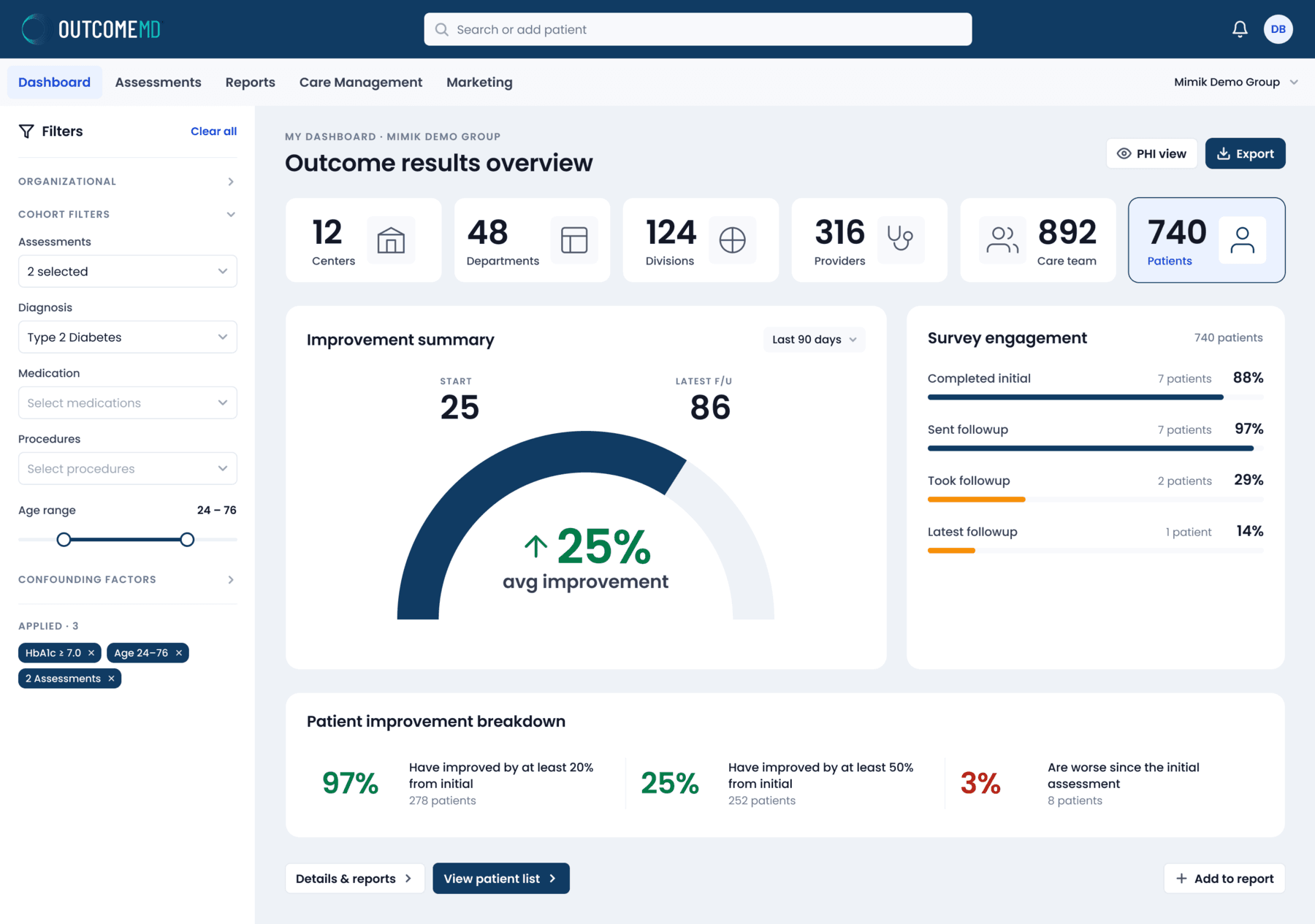
Every zone answers one question a care team asks, in the order they ask it: which patients, how they are doing, whether follow-up is happening, and what to do next. Here is each component, and the UX reasoning behind it.
Where do I start?
Finding a patient is the most frequent job, so search sits in the middle of the header instead of behind a menu, and the same field adds a new patient. The five destinations stay visible as plain-text tabs, and the active group lives top-right as a switcher.
#103B63#EAF1FFWhich patients am I looking at?
Filters left the canvas for a dedicated rail, grouped as Organizational, Cohort and Confounding factors. Only the group in use stays open, so the Applied summary stays in view however long the filter set gets, and active filters show up there as removable chips: auditable at a glance, one click to undo.
Is it safe to share this screen?
An eyebrow confirms where you are and the title names the job of the page. PHI view sits apart as its own toggle, so revealing protected health information is always a deliberate choice, and Export is the only filled button up top: one primary action, not five.
How big is this cohort?
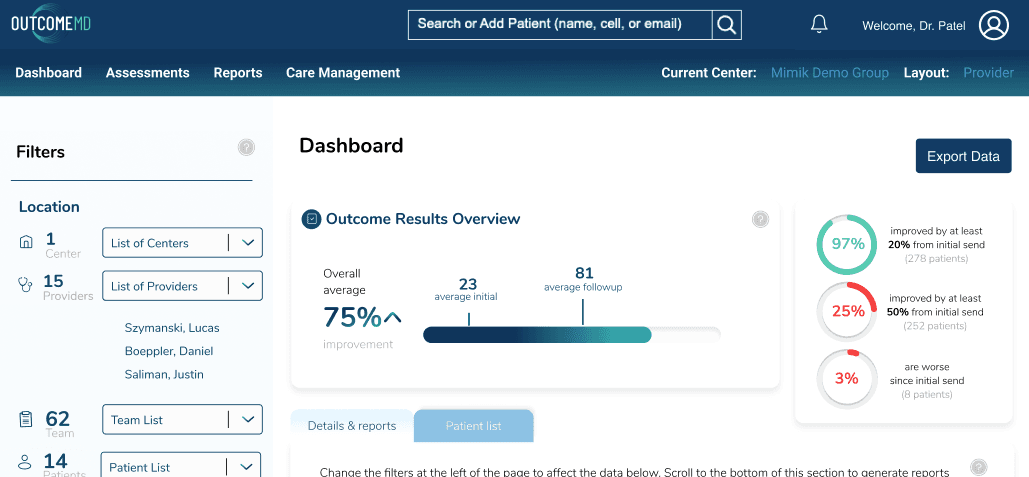
Six counts read from the widest level to the narrowest, centers down to patients, mirroring how a health organization is actually structured. Large numerals over quiet labels make the row scannable in one sweep, and the outlined patient card marks who the numbers below are about.
#274E72#2553D9Are patients getting better?
The answer comes first. Start and latest follow-up scores frame a half-ring, and the change, an average improvement of 25%, is the largest text on the card, paired with an arrow so it never relies on green alone. The time range stays explicit in the corner.
Can I trust these numbers?
Outcomes are only as reliable as survey completion, so the follow-up funnel sits right beside the result. Each step pairs a bar with a right-aligned rate; steps on track stay navy and the ones slipping turn orange, so the eye lands on the gap before reading a single row.
#103B63#F79009Who is slipping?
An average can hide the patients who are getting worse. The breakdown splits the cohort into three plain-language statements, each a large rate over its patient count, and red is reserved for one thing only: patients doing worse than their first assessment.
#027A48#B42318What do I do next?
The screen ends where the work continues. View patient list is the one filled button, the shortest path from an insight to the people behind it. Details & reports goes deeper, and Add to report sits apart on the right as a collect-for-later action.
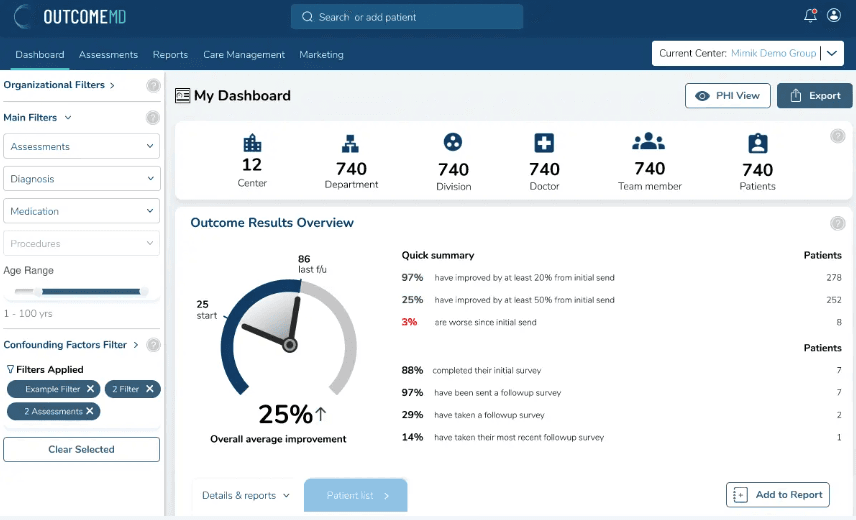
Sending an outcome assessment is three decisions: who receives it, what to send, and when it goes. Here is that screen rebuilt in the refined design — live, so you can pin, bundle, add to the cart and send it yourself.
Send an outcome assessment
Pinned assessments
Nothing pinned yet. Pin the assessments you send every day and they wait here — one tap for the next patient.
Bundles
Sample bundles, to show how a protocol is sent as one.
Choose a patient outcome assessment
The live product lists this category’s assessments here. This rebuild carries the Urological set from the original design.
The live product lists this category’s assessments here. This rebuild carries the Urological set from the original design.
The live product lists this category’s assessments here. This rebuild carries the Urological set from the original design.
Try it: pin an assessment and it is saved in the Pins tab.
Inguinal Hernia
Pelvic Organ Prolapse
Male
Pelvic Organ Prolapse
Female
Female Incontinence
The live product lists this category’s assessments here. This rebuild carries the Urological set from the original design.
The live product lists this category’s assessments here. This rebuild carries the Urological set from the original design.
The live product lists this category’s assessments here. This rebuild carries the Urological set from the original design.
The live product lists this category’s assessments here. This rebuild carries the Urological set from the original design.
The live product lists this category’s assessments here. This rebuild carries the Urological set from the original design.
The live product lists this category’s assessments here. This rebuild carries the Urological set from the original design.
The live product lists this category’s assessments here. This rebuild carries the Urological set from the original design.
The live product lists this category’s assessments here. This rebuild carries the Urological set from the original design.
The live product lists this category’s assessments here. This rebuild carries the Urological set from the original design.
The live product lists this category’s assessments here. This rebuild carries the Urological set from the original design.
The live product lists this category’s assessments here. This rebuild carries the Urological set from the original design.
The live product lists this category’s assessments here. This rebuild carries the Urological set from the original design.
One screen, three decisions. Who receives it sits at the top, what to send fills the middle, and the cart holds the send. The header is the same one the dashboard uses, so moving between outcomes and assessments never changes the frame.
The patient comes first, not last. Quick add takes only what is needed to send — a name and a way to reach them — so a new patient never blocks the clinic. Everyone already in the system is one search away.
Grouped by body system, priced in patient time. Sixteen categories open one at a time, and every assessment shows what it contains, how many questions it asks and how long it takes — so the burden on the patient is visible before anything is sent.
Pin it once, send it forever. The assessments a clinic sends every day do not belong behind a search. Pin one and it is saved in the Pins tab, waiting for the next patient — which is exactly what happens in the rebuild above.
Protocols travel together. Assessments that always go out as a set are grouped once and sent as one — a follow-up protocol becomes a single action instead of separate searches.
See the patient's side before sending. Preview opens the questionnaire exactly as the patient receives it, so a clinician can judge the wording and the length without sending themselves a test link.
One review, one send. Pins, bundles and search all feed the same cart. Before it goes, the cart adds up what the patient is being asked for — assessments, questions and minutes — and then sends in a single action.
A guided carousel of research boards, flow maps, personas, tooling, and solution framing that explains how the UX direction was shaped.
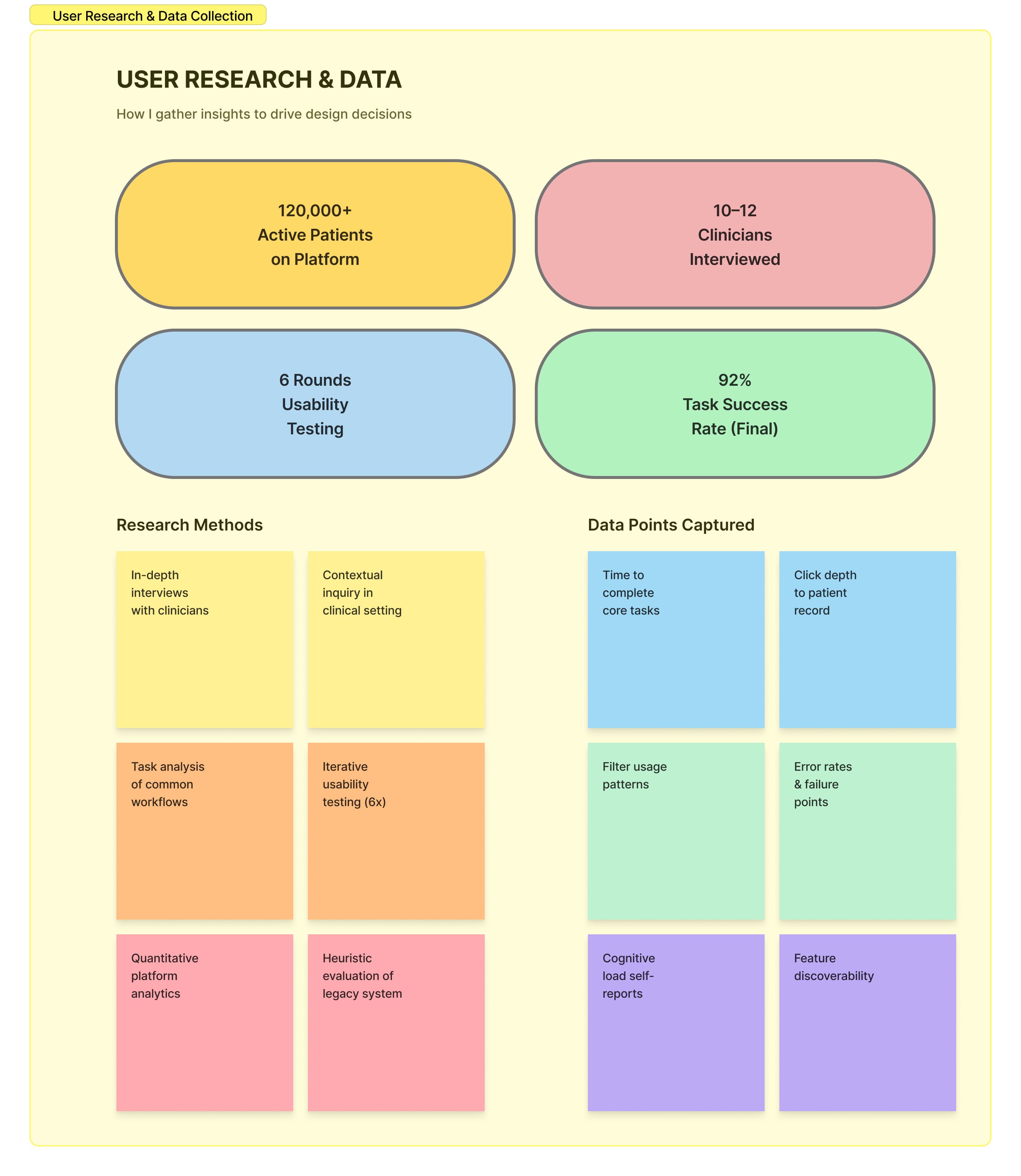
Clinician interviews, task analysis, and platform data gave the redesign a measurable starting point.
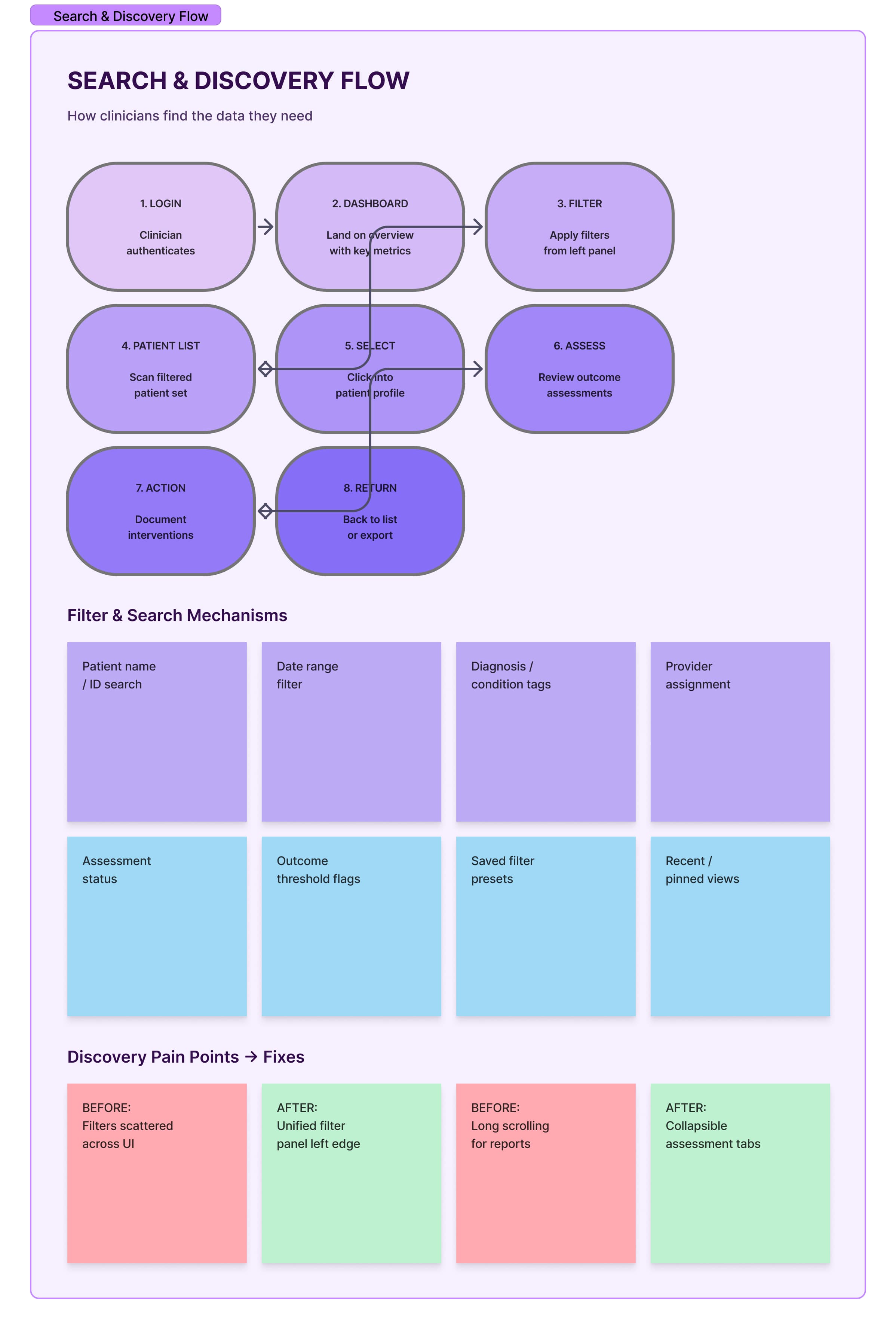
The search path was mapped from login to dashboard, filters, patient list, assessment review, and return actions.
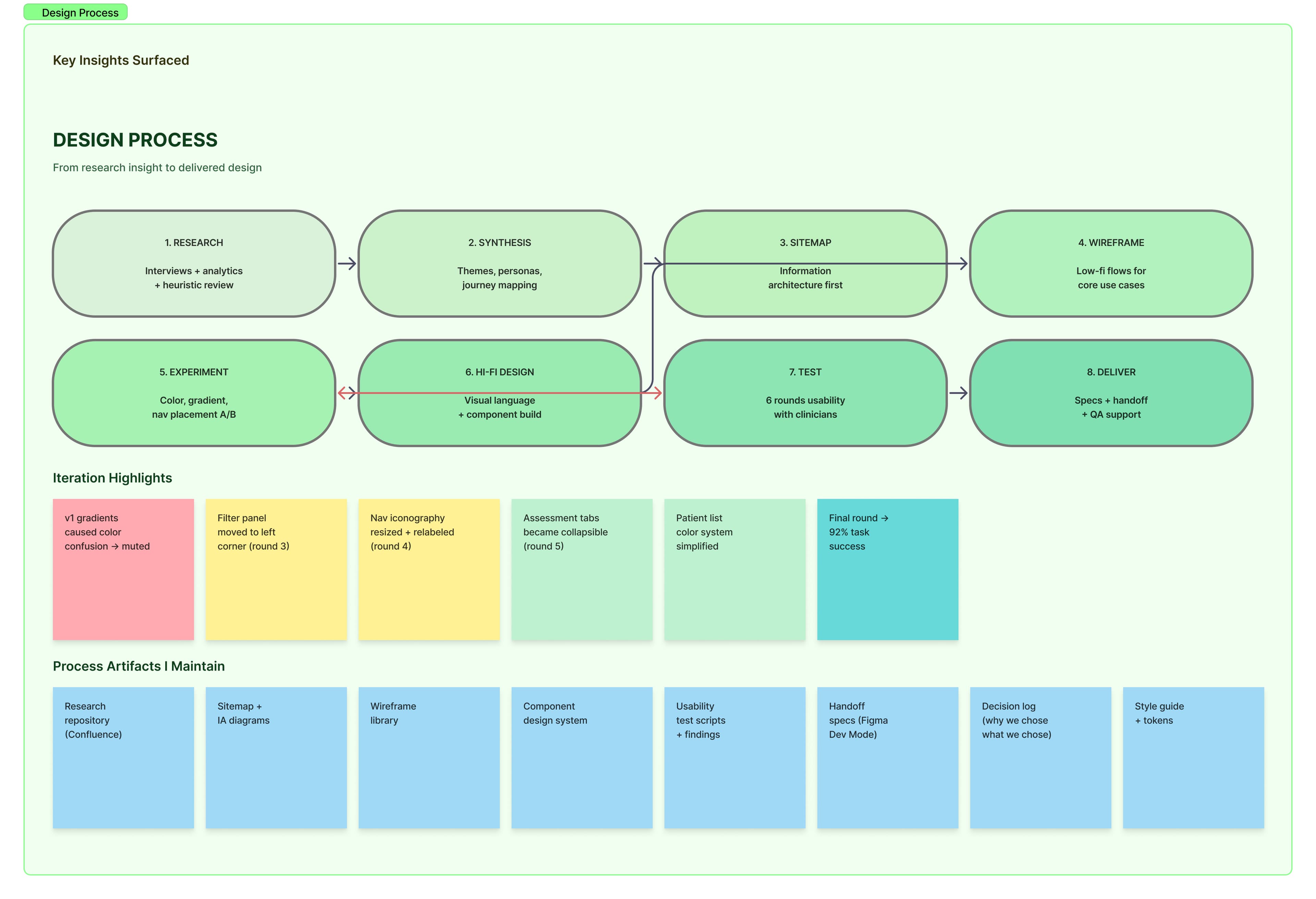
The process moved through synthesis, sitemap, wireframe, experiment, high-fidelity design, testing, and delivery.
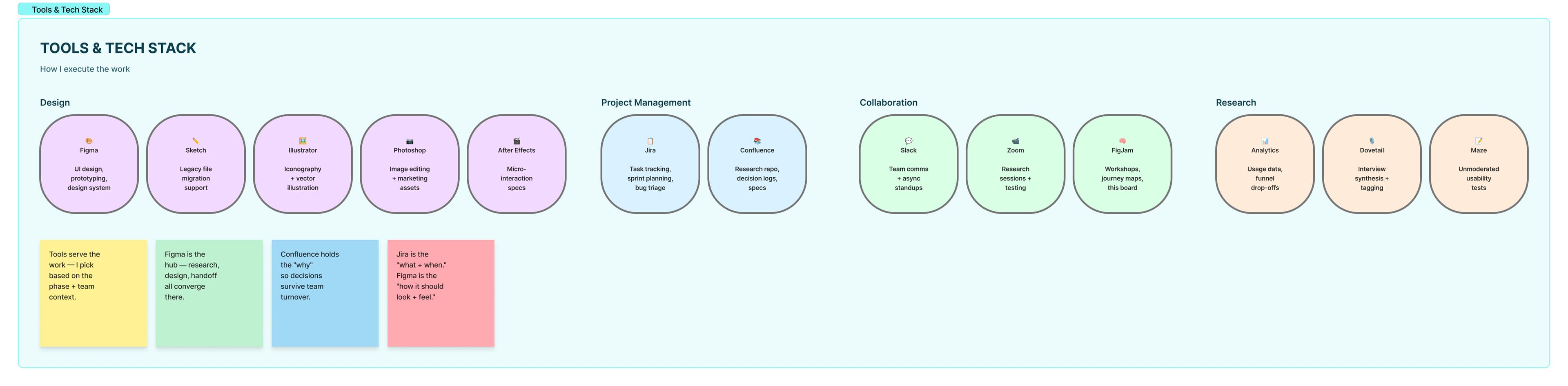
Design, project management, collaboration, and research tools were organized around handoff and decision tracking.
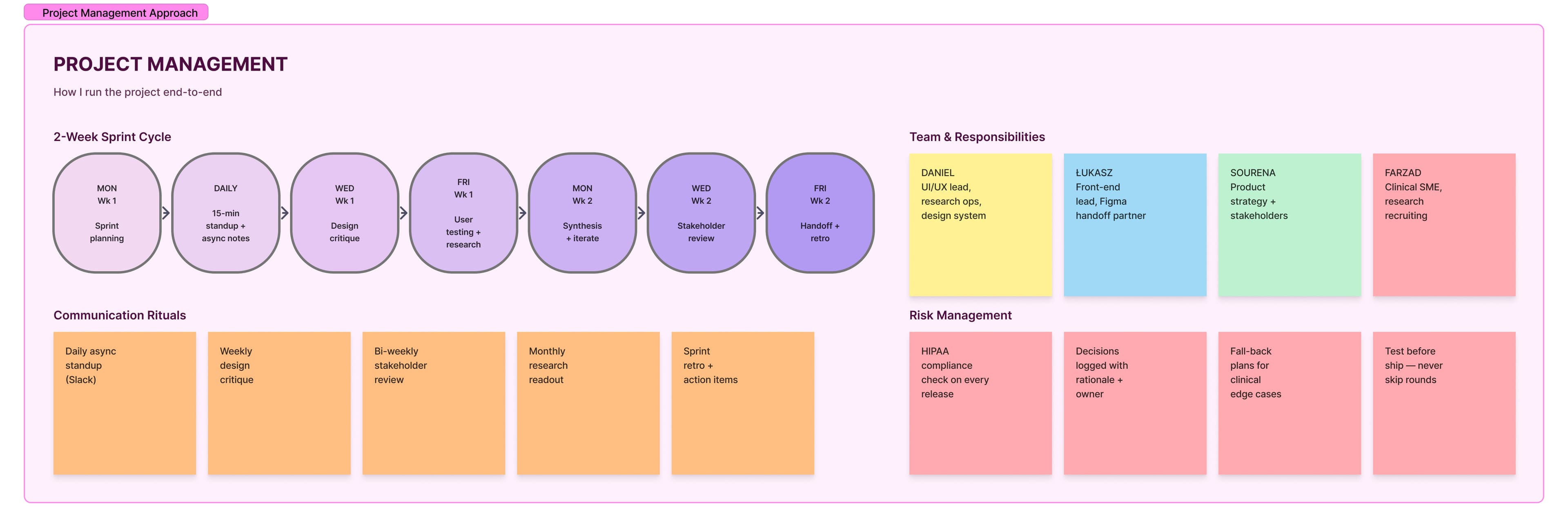
Sprint rituals, responsibilities, risk management, and communication practices kept research and delivery aligned.
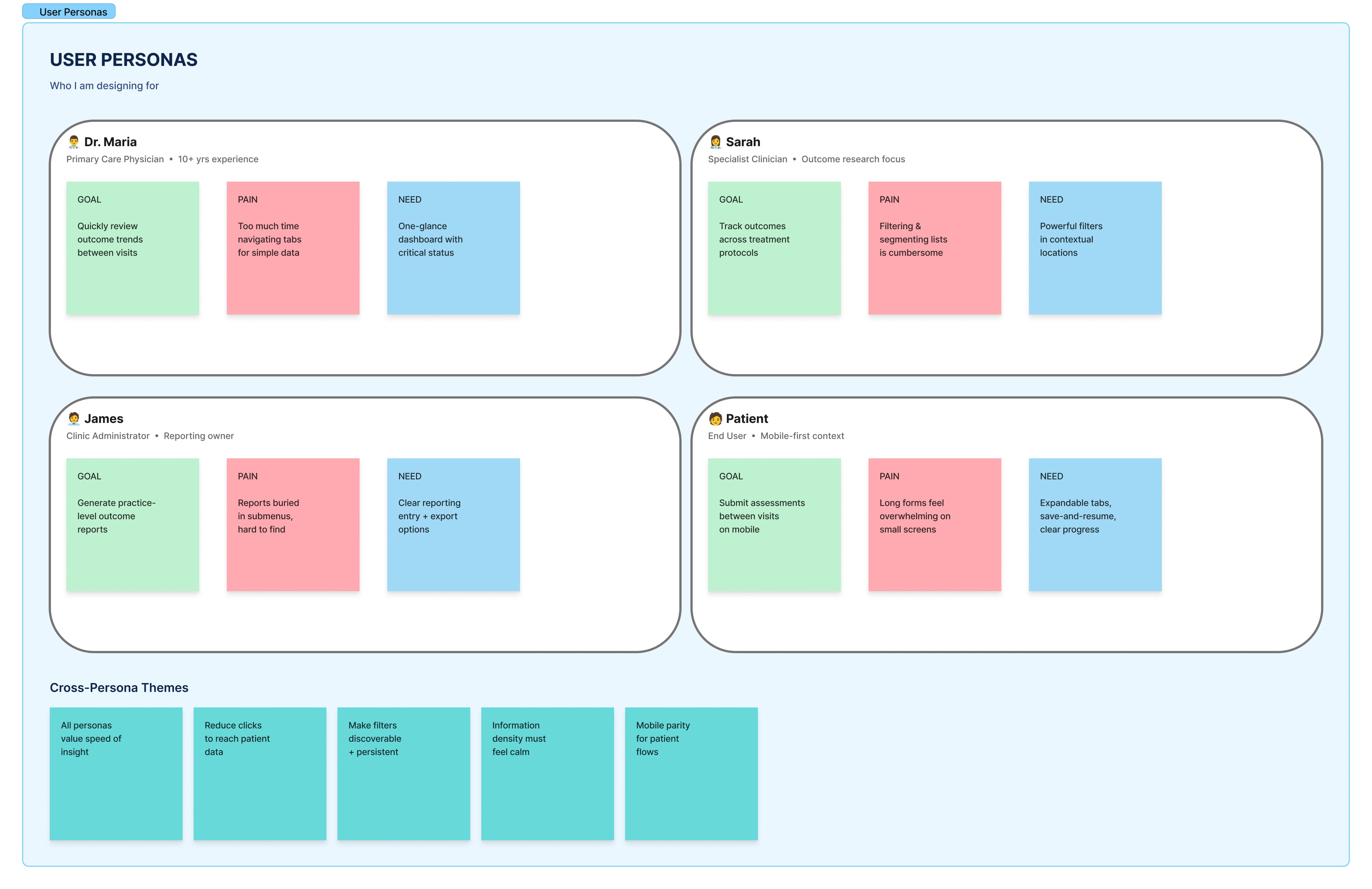
Personas clarified the needs of primary care, specialist, administrator, and patient-facing workflows.
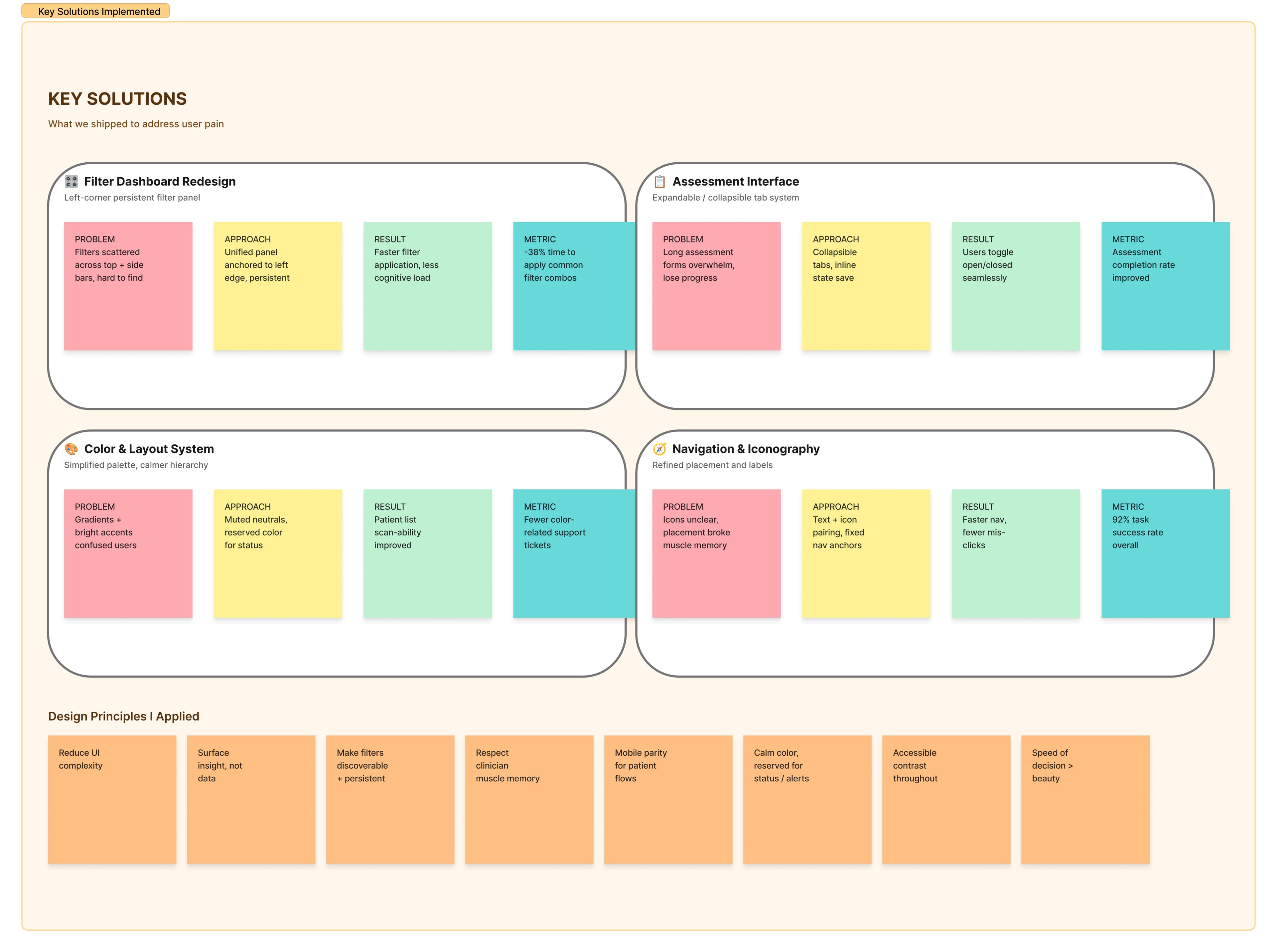
The redesign focused on persistent filters, assessment flow, navigation that surfaces next steps, and a more usable layout system.
In clinical software, every extra moment of hesitation matters. The redesign reduced scanning effort, clarified the hierarchy of patient data, and made long assessment workflows feel less mentally expensive.
The dashboard was reorganized so outcomes, patient scope, and follow-up status could be understood before users dug into details.
Assessment selection, long forms, and record detail views were structured around progress, state, and next-action visibility.
Filters, result summaries, export actions, and patient lists share the same logic so users do not rebuild context at every step.
Before moving into detailed UI, I mapped the dashboard ecosystem so the product could support real clinical movement instead of isolated screens.
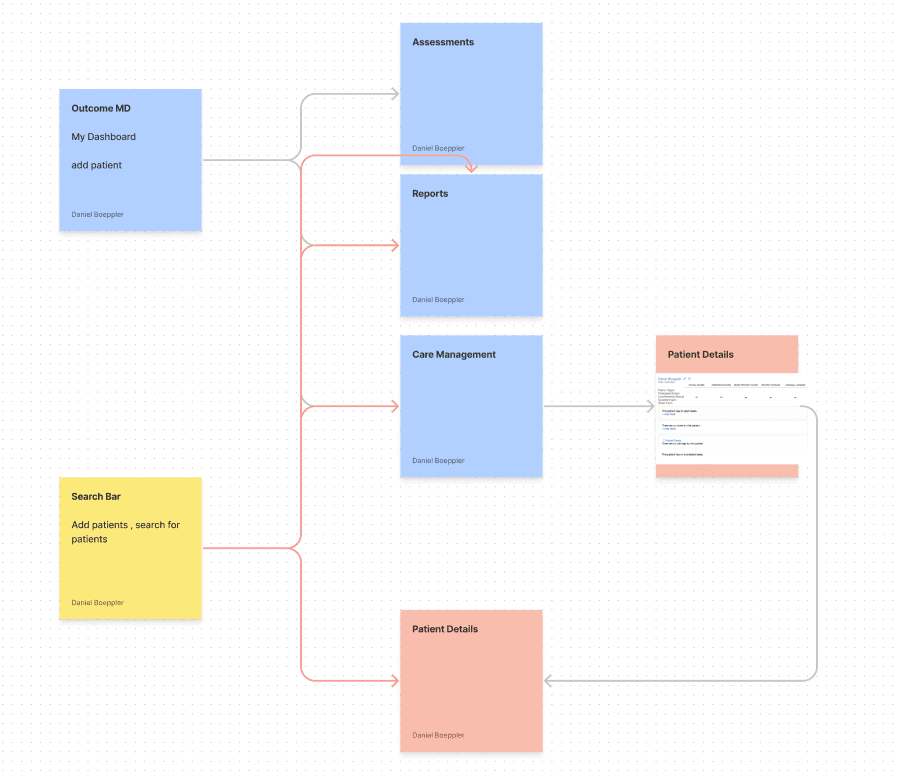
Dashboard entry points, assessments, reports, filters, and patient details were connected first so the interface could behave like one system.
The sitemap clarified how dashboards, assessments, reports, and patient details needed to connect before visual design started.
Centers, providers, patients, assessments, diagnoses, filters, and reports became the organizing structure for the product.
The final structure supported easier movement between scanning outcomes, filtering cohorts, and reviewing patient-level evidence.
A small but disciplined system underpins every screen — type, spacing, color tokens, and a focused component library. Tap a card to view each documentation page.
We explored multiple dashboard directions and used research feedback to understand which patterns made the data easier to find, compare, and trust.
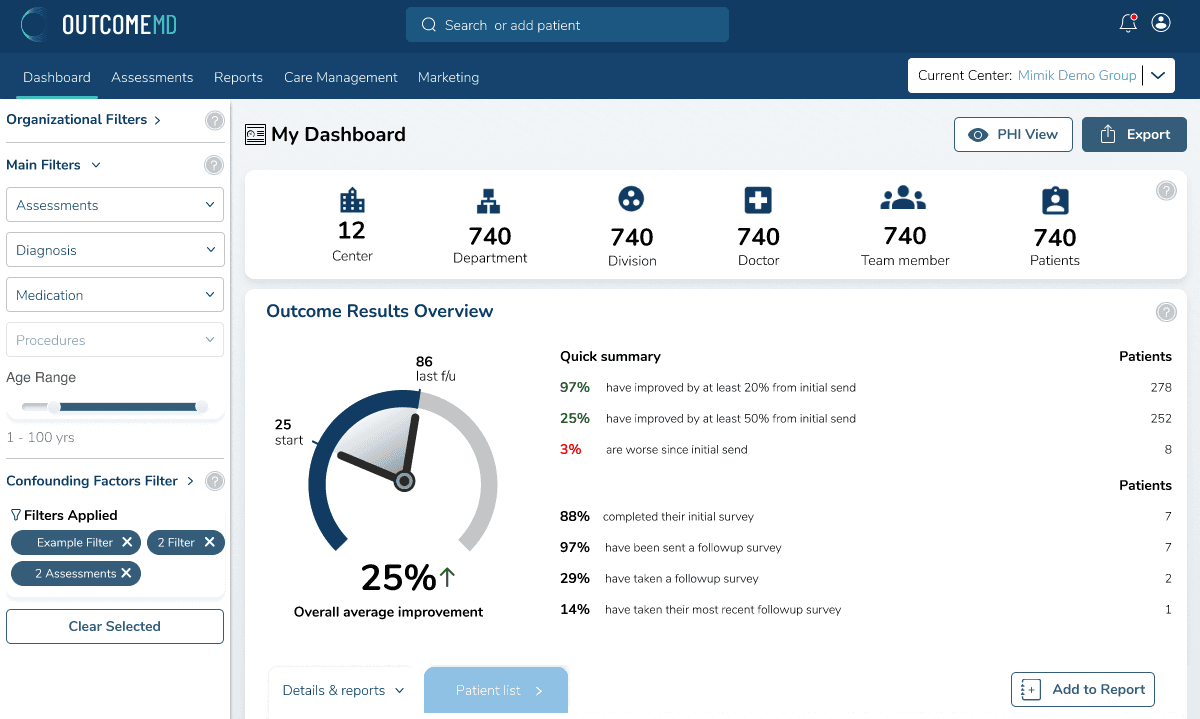
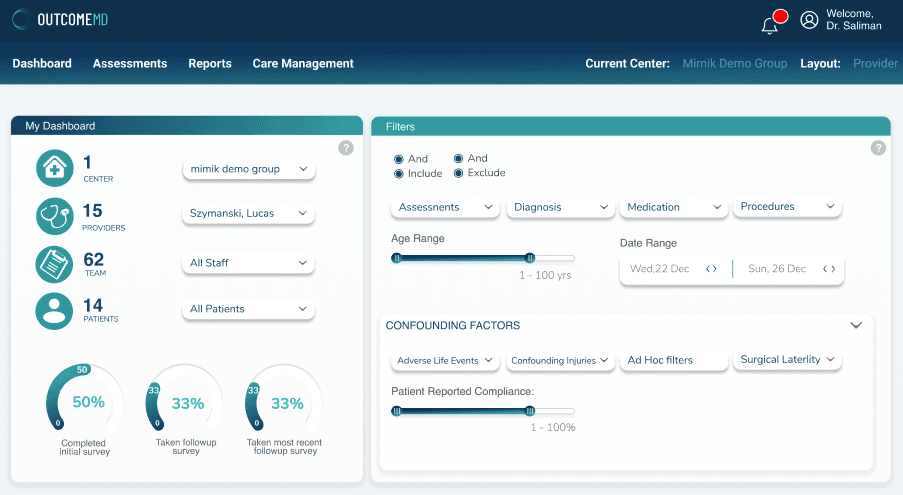
Research showed that mixed colors, gradients, and competing panels made some users work harder to understand the hierarchy.
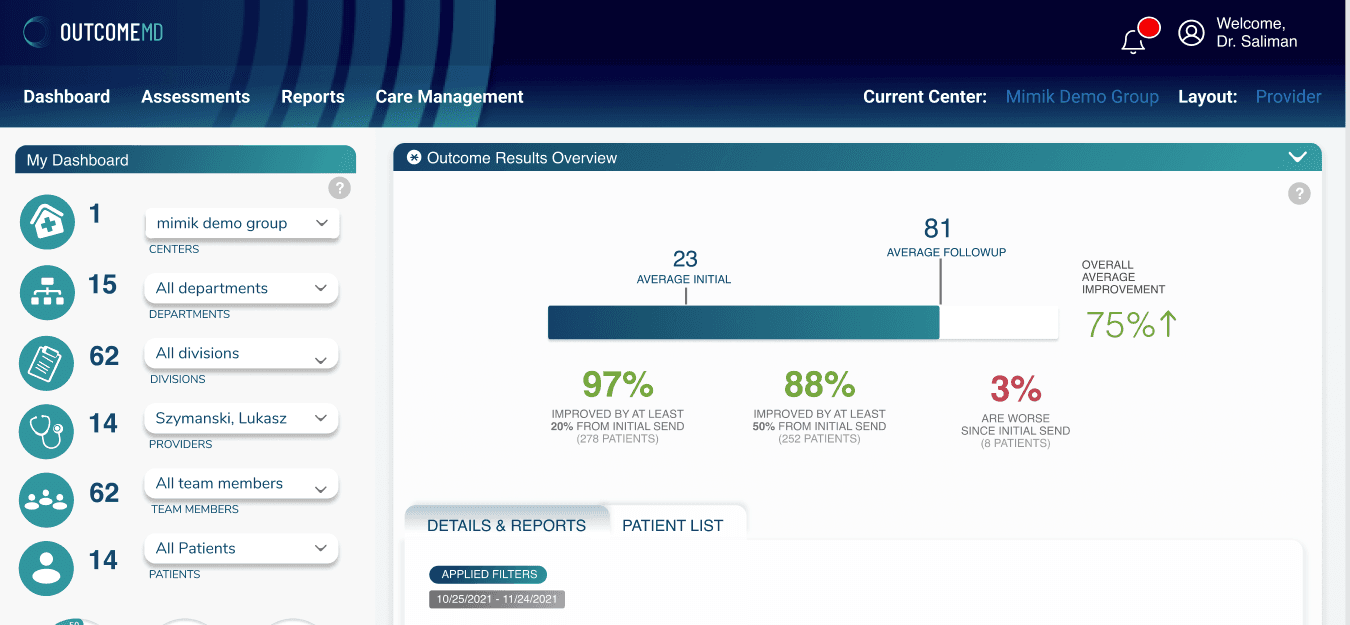
The top navigation and left icon system needed to become less dominant so clinicians could find the data faster.
OutcomeMD needed clinicians to segment patient data, move into reporting, and return to detail views without losing trust in the state of the system. The filter model was redesigned to stay persistent, visible, and easier to reason through.
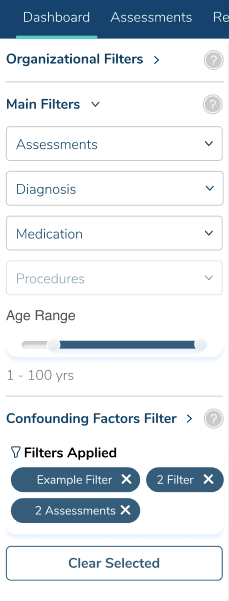
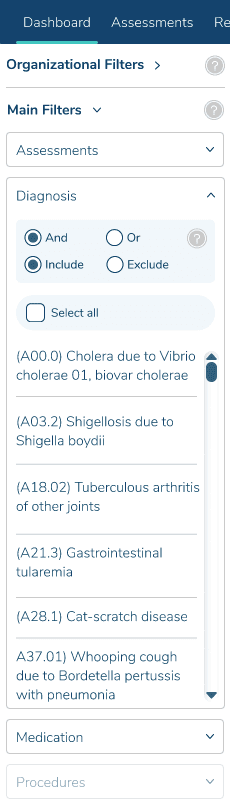
And/or, include/exclude, select-all, and long diagnosis lists are exposed as deliberate choices for cohort building.
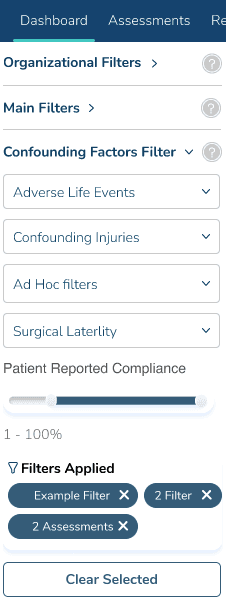
Life events, injuries, laterality, compliance ranges, and selected chips live beside the data they affect.
Provider, center, team, and patient selectors establish scope before completion gauges and outcome cards appear.
The dashboard compares baseline, follow-up, improved, and worsened values without making users decode raw tables first.
Outcome categories inherit the same scope, making it easier to compare clinical signals across a selected cohort.
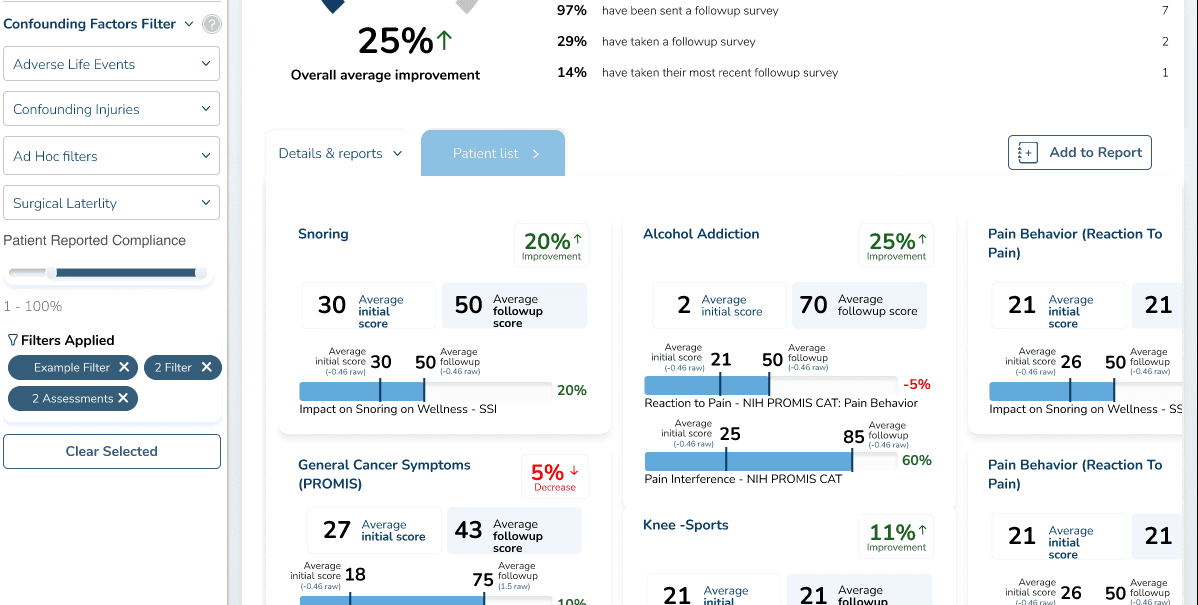
Reporting actions remain beside the filtered view, so evidence can move directly into review or follow-up.
Patient names, status, scores, and movement are grouped so teams can inspect the evidence behind a trend.
Filtered rows, report fields, and notification setup give teams a traceable path from cohort to patient follow-up.
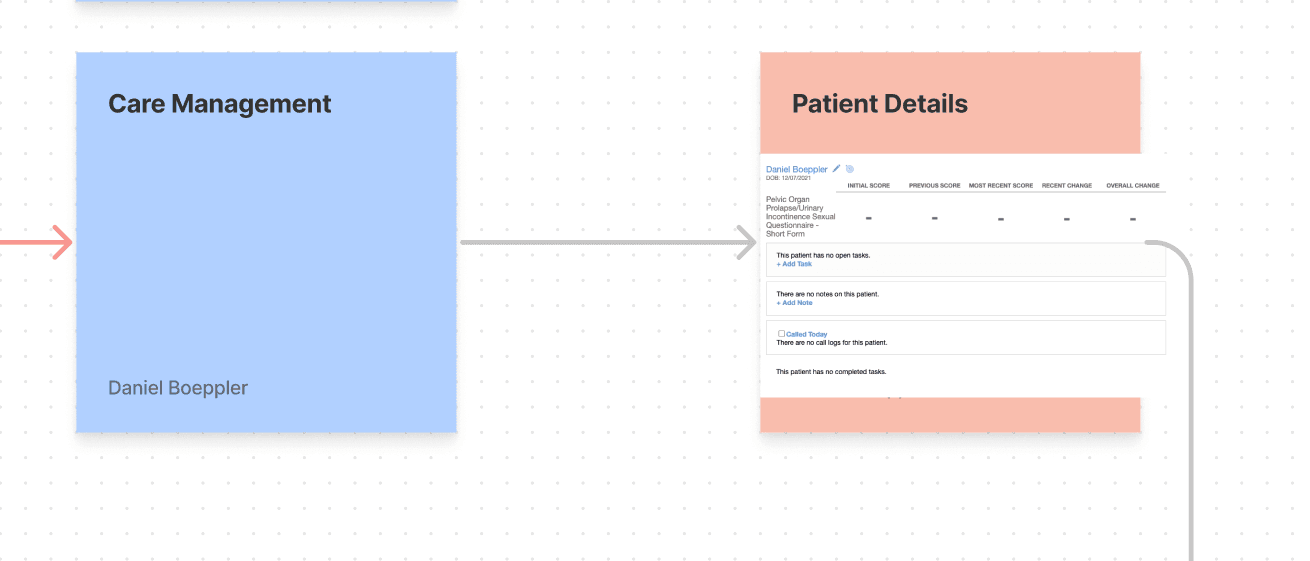
Beyond the shipped screens, the project included workflow maps, care-management explorations, and monitoring concepts that helped align the broader product behavior.
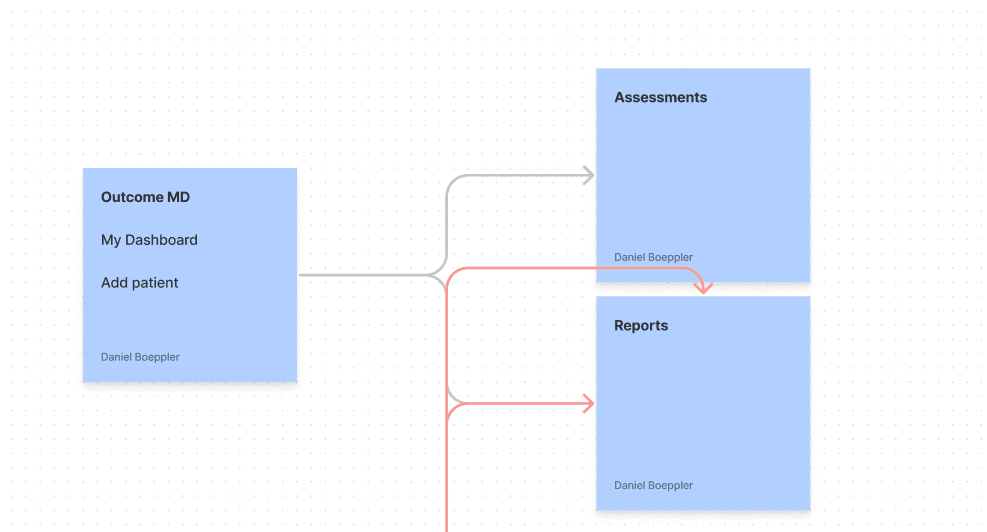
The flow shows where clinicians need to move from care management context into individual patient review without losing the thread.
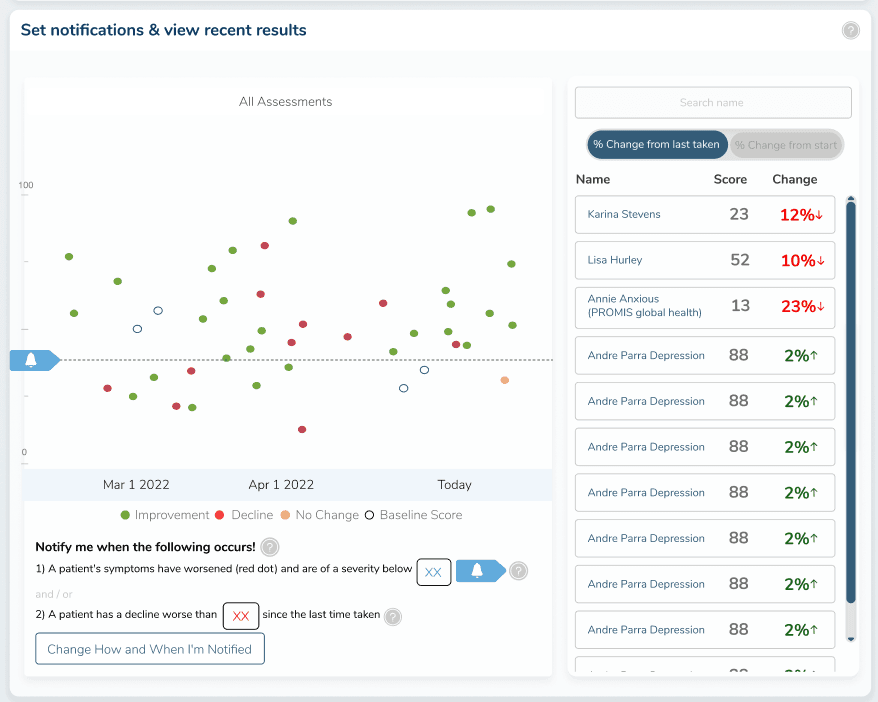
Alerts, result movement, and patient lists transform outcome tracking from passive reporting into a follow-up workflow.
The strongest result was a more focused working surface for clinicians: less visual noise, visible priorities, and a product language that could support serious healthcare work with fewer second-guesses.
Strong healthcare UX reduces hesitation at the exact moment people need orientation.